
SAP E-Signature Integration
SAP e-Signature Integration
SAP e-Signature Integration: Credit Memos Signed by Both Sides Through eGov Business
A distribution company in Kazakhstan running SAP S/4HANA needed every credit memo for returned goods to be signed electronically by both parties: the company and the customer. Company signatures were applied by hand, documents went out by e-mail, and nobody could see which customers had not signed yet.
Natura Systems built an SAP e-signature integration that signs each credit memo with the company’s NCA RK (НУЦ РК) certificate automatically, sends it to the customer through a secure link, SMS or QR code, and receives the customer’s signature directly from the government eGov Business app. No third-party e-signature service sits in between. Every signature is verified, the signer’s BIN is matched to the customer in SAP, and the document is stored with its full evidence in a write-once archive.
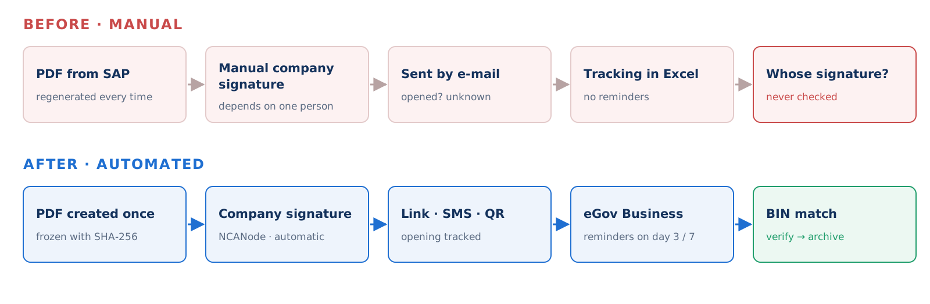
SAP e-Signature Integration Architecture
The design follows the same principle as our SAP Webkassa integration and SAP WhatsApp integration: SAP decides what happens, and a separate .NET service talks to the outside world. The internet-facing surface is kept as small as possible. The customer’s browser and the eGov app only talk to a gateway in the DMZ, and that gateway has no access to the database, the signing server or the company certificate. All business logic and authorisation live in the internal service.
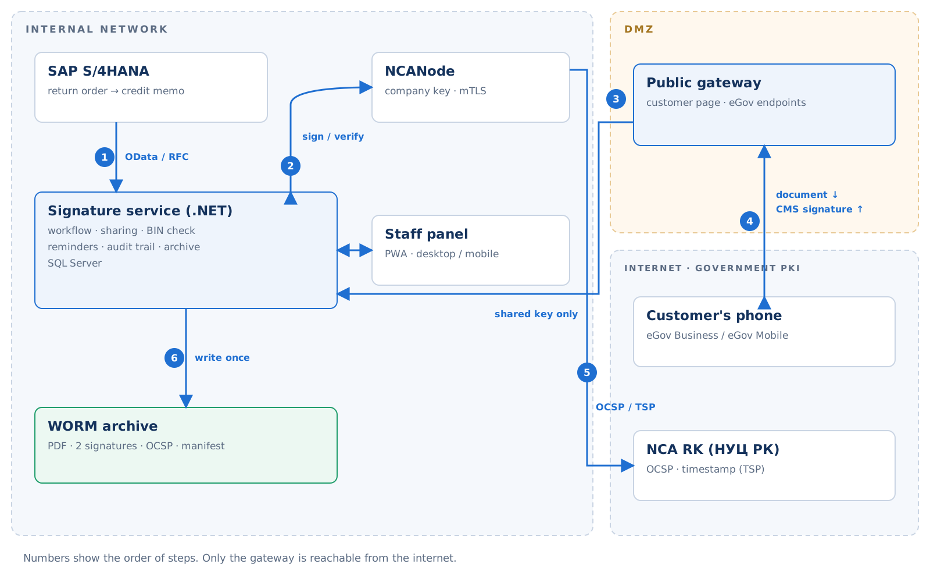
The Solution: From SAP to eGov and From eGov to the Archive
Which Industries Benefit?
Why Natura Systems for SAP e-Signature Integration in Kazakhstan
We built a .NET platform that takes the credit memo from SAP S/4HANA, applies the company signature on the server, shares the document with the customer, receives the customer's eGov Business signature on our own gateway, and archives both signatures together. Staff follow the whole process in a web panel that works on desktop, tablet and phone. The customer installs nothing: they use the government app that is already on their phone.
Technology: SAP S/4HANA · OData / RFC · .NET · ASP.NET Core · NCANode · KalkanCrypt · eGov QR signing (NITEC-S-5096) · NCA RK OCSP / TSP · CMS (detached) · SQL Server · IIS · PWA
1. Taking the document from SAP and freezing it
The credit memo PDF is generated in SAP only once. Its SHA-256 hash is calculated and the file is written to permanent storage that only allows "write if absent"; no code path can overwrite it. Each time the document is read (before sharing, when shown to the customer, when sent to eGov and when archived), the hash is checked again. If it does not match, processing stops and an alert is raised.
2. Company signature: on the server, with no manual step
The company's NCA RK legal-entity key is kept only on an NCANode server inside the internal network and is never exposed to the internet. Each signature is stored with a timestamp (TSP) and certificate status proof (OCSP), so it can be shown to have been valid at the moment of signing even years after the certificate expires. Credit memos above a configurable amount threshold are not signed automatically; they go to approval first.
3. Sharing with the customer: link, e-mail, SMS or face-to-face QR
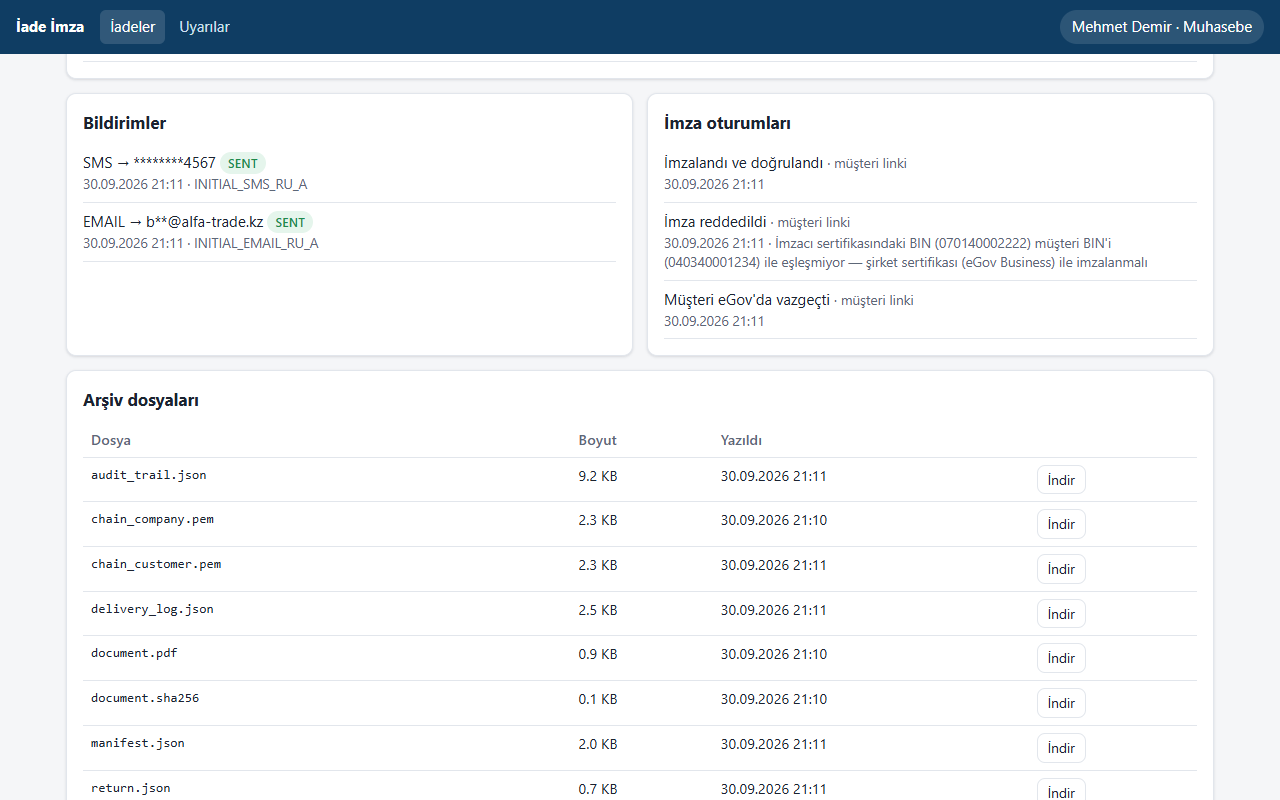
Every signed credit memo appears in the panel's "to share" list. Customer service sends it with one click as a link, e-mail or SMS, using Russian or Kazakh templates. The link carries a 256-bit random key, and only its hash is stored in the database. If the customer is in the office, the panel shows a QR code that the customer scans with eGov Business to sign on the spot
- Distribution and FMCG — high return volumes, many corporate customers, cash flow tied to VAT offset
- Pharma and medical — strict documentation and traceability for returned products
- Electronics and white goods — warranty returns and heavy paperwork with the dealer network
- Automotive spare parts — multi-line, frequent returns with dealers
- Building materials and industrial products — signatures required on high-value returns
- Turkish and international groups operating in Kazakhstan — SAP run centrally, local compliance required
Projects like this sit where three areas meet: the SAP document chain, cryptographic signature infrastructure and local government systems. Natura Systems works on all three.
- SAP first. Return orders, credit memos and the accounting document chain in SAP S/4HANA, handled by our SAP S/4HANA consultants.
- Kazakhstan e-signature know-how. NCA RK, NCANode, the eGov QR signing protocol, and day-to-day experience with ИС ЭСФ through our local tax reporting
- A proven .NET pattern. The same approach already runs our SAP Webkassa integration: SAP decides, .NET delivers, and the ERP stays off the internet.
- Compliance built in. Long-term signature proof, an append-only audit trail and a write-once archive support the company's legal and tax compliance
- SAP Quality Award Grand Winner.
- Local presence in Türkiye and Central Asia, with Russian, Kazakh, Turkish and English support.
- End-to-end delivery and support — from analysis and the SmartBridge application to IIS installation and live support through our ERP and BI support
- Ready to Automate Your Credit Memo Signatures?
- FAQ (Frequently Asked Questions)
If your credit memos still wait for signatures nobody is tracking, or you are unsure who actually signed them, talk to us. We will review your SAP return and billing process and your signing setup, and tell you plainly whether the solution is worth it in your case.
What is SAP e-signature integration in Kazakhstan?
It connects SAP S/4HANA to Kazakhstan’s NCA RK signature infrastructure and the eGov apps. A document created in SAP, such as a credit memo, is signed automatically with the company’s certificate, sent to the customer, signed by the customer in eGov Business, verified, and archived with its full evidence.
Do we need a separate e-signature service for the customer’s signature?
No. The customer signs directly in the government eGov Business app (eGov Mobile for individuals). The company only needs to apply through SmartBridge for a connection to the eGov QR signing service (NITEC-S-5096).
Does the customer have to install an app?
No. eGov Business is the official app that companies in Kazakhstan already use for government services. The customer opens the link and presses Sign; on a phone the app opens automatically, and on a computer they scan a QR code.
What happens if the wrong person or another company signs?
The signature is rejected. The BIN in the certificate is compared with the customer’s BIN in SAP; if they do not match, the signature is not accepted and the reason is shown on the customer page. A signature made with a personal certificate instead of the company’s is rejected in the same way.
Can a signature still be proven valid after the certificate expires?
Yes. A timestamp and OCSP proof are captured at the moment of signing and stored in the archive. Both signatures are re-verified when the document is archived, and the report is added to the folder, so validity at signing time can be shown years later.