
SAP POS Payment Integration
SAP POS Payment Integration
SAP POS Payment Integration: The Right Amount, the Right Bank, Every Time
A multi-store retailer with stores sold through SAP S/4HANA at the till, but card payments ran on a separate track. After finishing the sale in SAP, the cashier typed the total into the payment terminal by hand, picked a bank application and handed the terminal to the customer. SAP never learned which bank processed the card, how many installments the customer chose, or whether the amount charged matched the invoice.
The result was a reconciliation problem every month. Finance matched card slips, Z reports and bank settlements line by line, and every typo or wrong bank choice became a manual correction.
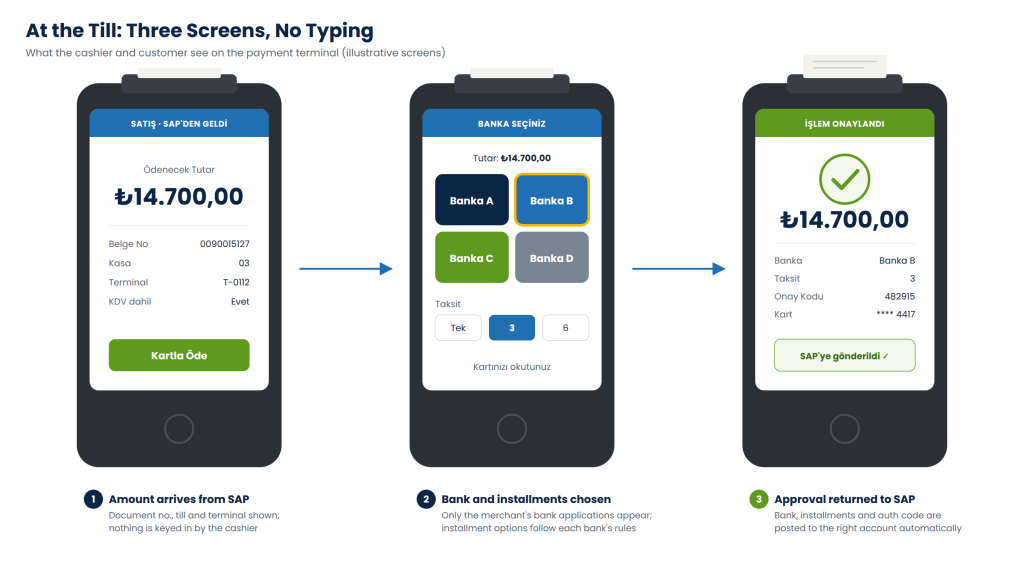
Natura Systems connected SAP directly to the stores’ new-generation payment terminals. When the cashier selects card payment, SAP sends the exact amount to the terminal. The terminal shows the merchant’s bank applications, the customer pays, and the approval comes back into SAP with the bank, the authorisation code and the installment count. SAP then posts the payment to the right bank account. Nobody types an amount, and nobody guesses the bank.
SAP POS Payment Integration Architecture
The design follows the same principle as our SAP Webkassa integration and our SAP WhatsApp integration: SAP decides what happens, and a separate .NET service talks to the devices. SAP application servers never communicate with terminals directly, and store hardware never needs access to the ERP.
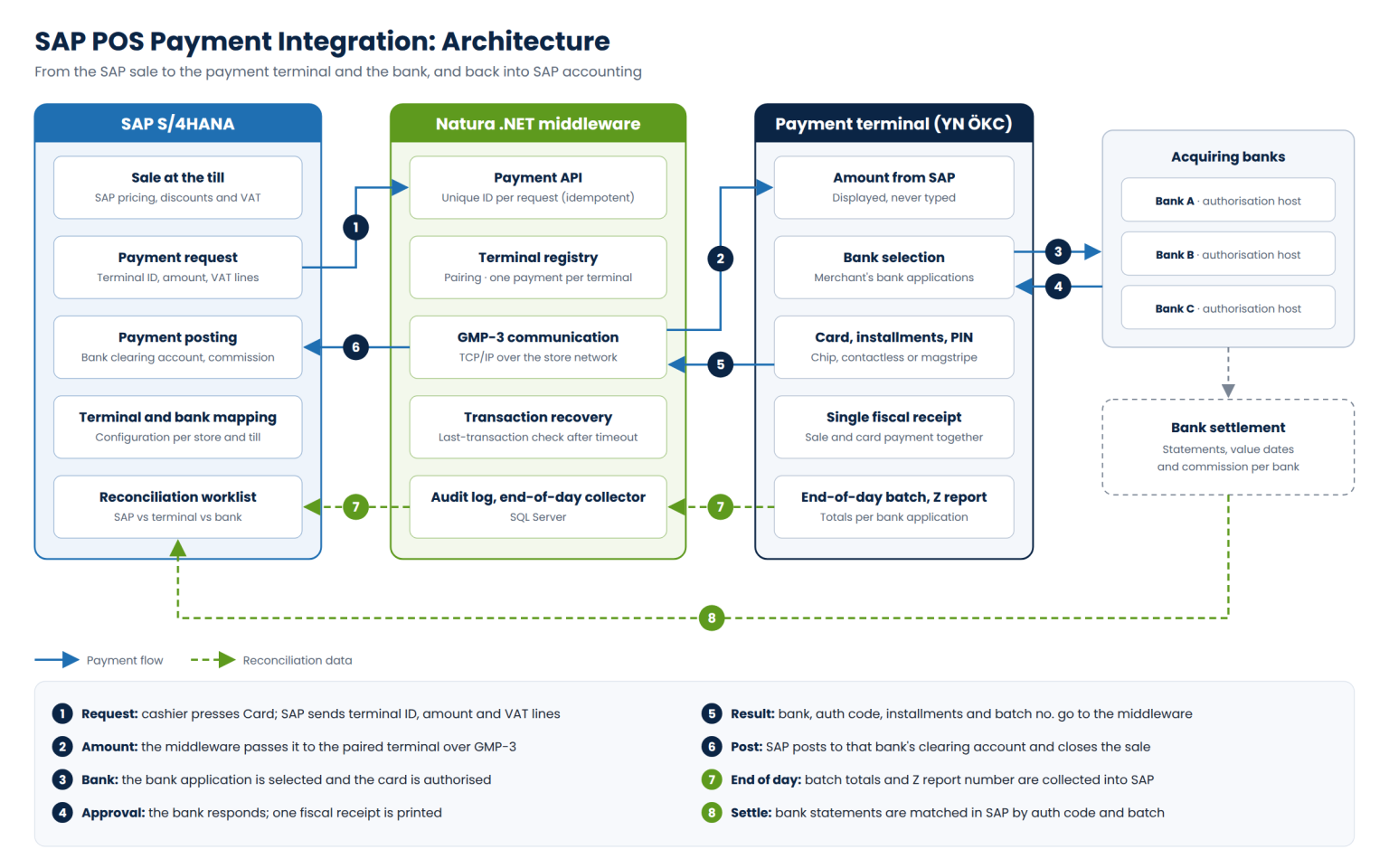
SAP side: sale, payment request and posting
The .NET middleware: GMP-3 link and one payment per terminal
Terminal side: bank applications, installments and one fiscal receipt
- Sale at the till. The sale is recorded in SAP with standard pricing conditions, promotions and VAT, so the amount sent to the terminal is the same amount on the invoice.
- Payment request. A card payment button on the cashier screen calls the middleware through RFC with the terminal ID, amount, currency, document number and VAT lines the device needs for the fiscal receipt.
- Payment posting. On approval, SAP posts the incoming payment to the clearing account of the bank that processed the card and stores the authorisation code, installment count and batch number on the document.
- Configuration tables. Which terminal belongs to which till, which bank applications are active in each store, and which GL account each bank maps to are all maintained in SAP, not hard-coded.
Posting logic, account determination and commission rules are designed by our SAP S/4HANA consultants together with the retailer's finance team, so that card receipts meet the company's legal, tax and IFRS requirements
- GMP-3 communication. The middleware pairs with each terminal and exchanges messages over the store network using GİB's GMP-3 protocol.
- One payment per terminal at a time. A terminal can hold only one open payment request. A second request is refused until the first is finished.
- No double charges. Every request carries a unique ID. If SAP times out and retries, the middleware returns the result it already has instead of charging the card again.
- Transaction recovery. If the connection drops mid-payment, the middleware asks the terminal for the status of its last transaction before anything is retried or posted.
- Audit log. Every request, response and status change is stored in SQL Server with a timestamp, giving finance and auditors a complete electronic trail.
New-generation ÖKC terminals with a built-in card reader can host several bank applications on one device. The integration uses that: the terminal shows the merchant's banks, each with its own installment and loyalty rules, and the cashier never has to switch devices. Optionally, SAP can suggest a default bank per store or payment type confirm whether this is used.
The terminal prints one fiscal receipt that covers the sale and the card payment together. When the customer needs an invoice, SAP issues the e-Archive invoice and the terminal prints the matching information slip, and the invoice can then be sent to the customer's phone through our SAP WhatsApp integration.
- End-of-day and bank reconciliation
- Why Natura Systems for SAP POS Payment Integration
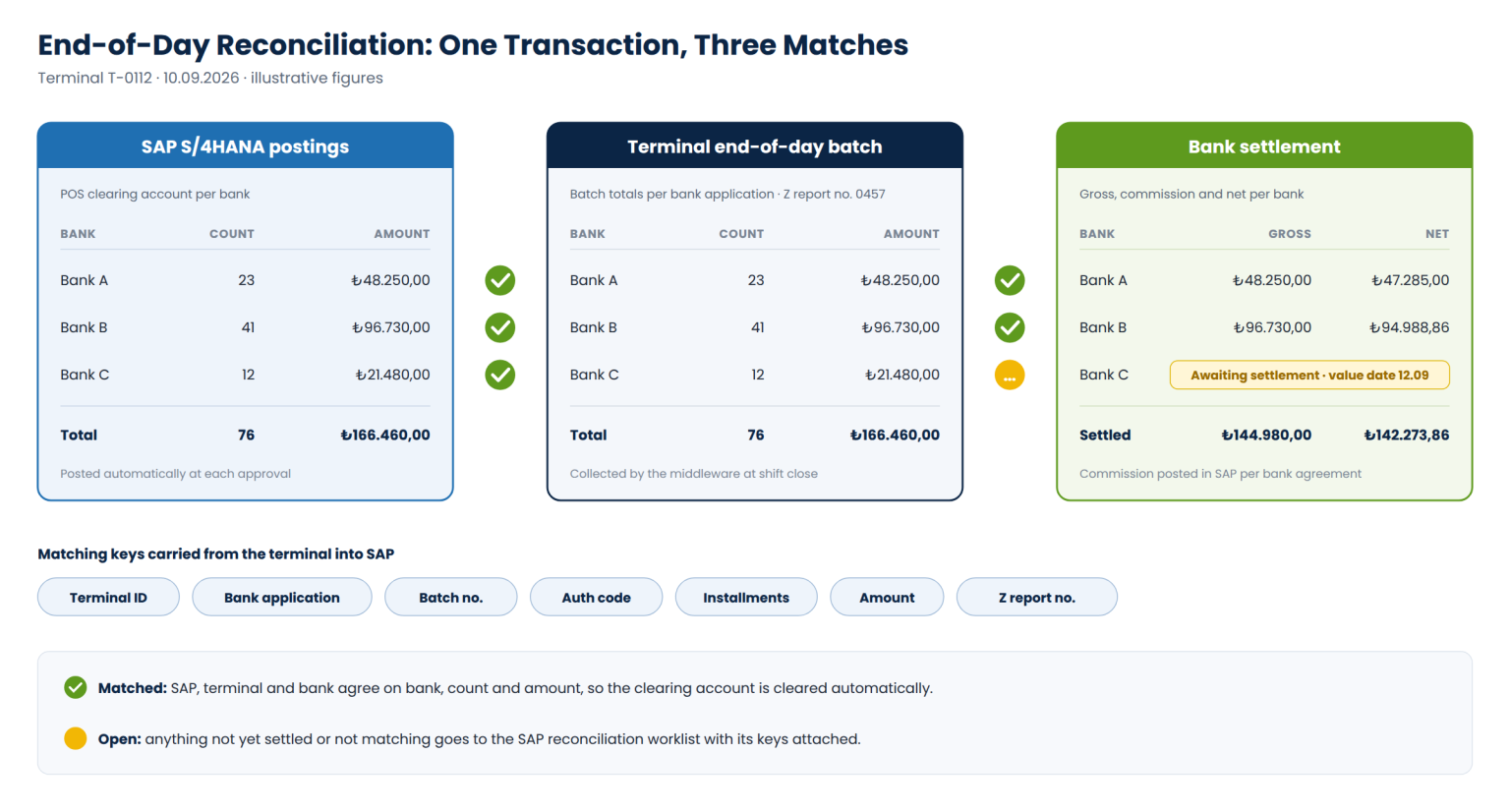
At shift close, the middleware collects each terminal’s end-of-day batch totals per bank, together with the Z report number, and SAP compares them with its own postings for that terminal. When the bank settlement arrives, SAP matches it by bank, batch and authorisation code, posts the commission and clears the clearing account.
- SAP first. Pricing, posting, account determination and reconciliation all live in SAP S/4HANA, designed by SAP consultants who know both SD and FI.
- Fiscal devices are familiar ground. We already connect SAP to fiscal systems through our SAP Webkassa integration in Kazakhstan, and to GMP-3 terminals in Türkiye.
- Automation and device integration experience. From weighbridges and PLCs to payment terminals and messaging platforms, we connect SAP to hardware every day.
- Built for money. Idempotent requests, one payment per terminal, last-transaction recovery and a complete audit log are part of the first release.
- SAP Quality Award Grand Winner.
- Local presence in Türkiye and Central Asia, with multilingual support and experience of local tax reporting requirements.
- Long-term support after go-live, covering new terminals, new bank agreements and protocol updates through our ERP and BI support