
SAP WhatsApp Integration
SAP WhatsApp Integration
SAP WhatsApp Integration: E-Invoices on the Customer’s Phone Seconds After Checkout
A multi-store retailer running SAP S/4HANA was issuing e-Archive invoices a day, and most of them never reached the customer in a form they could use. Printed copies were left on the counter. E-mail addresses typed at the till bounced. Customers came back to the store asking for duplicates they needed for warranty claims or expense reports.
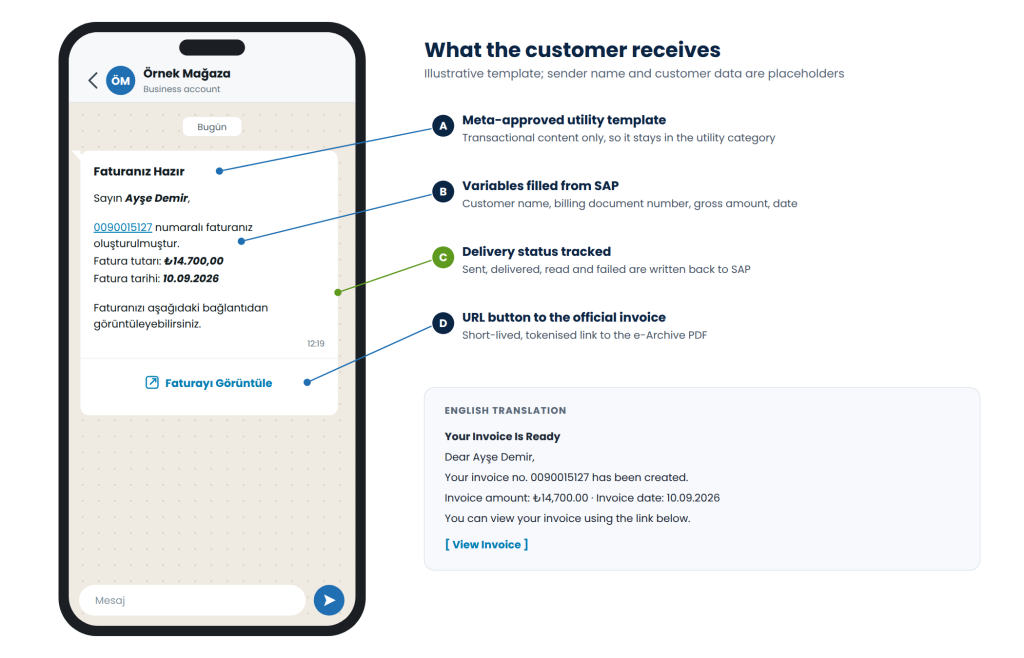
Natura Systems built an SAP WhatsApp integration that sends each invoice to the customer’s WhatsApp as soon as SAP and the e-Archive integrator have finished with it. The customer receives a short, Meta-approved message with the invoice number, amount and date, and a View Invoice button that opens the official PDF. SAP stays the system of record, a dedicated .NET middleware does the messaging work, and every delivery status is written back to SAP.
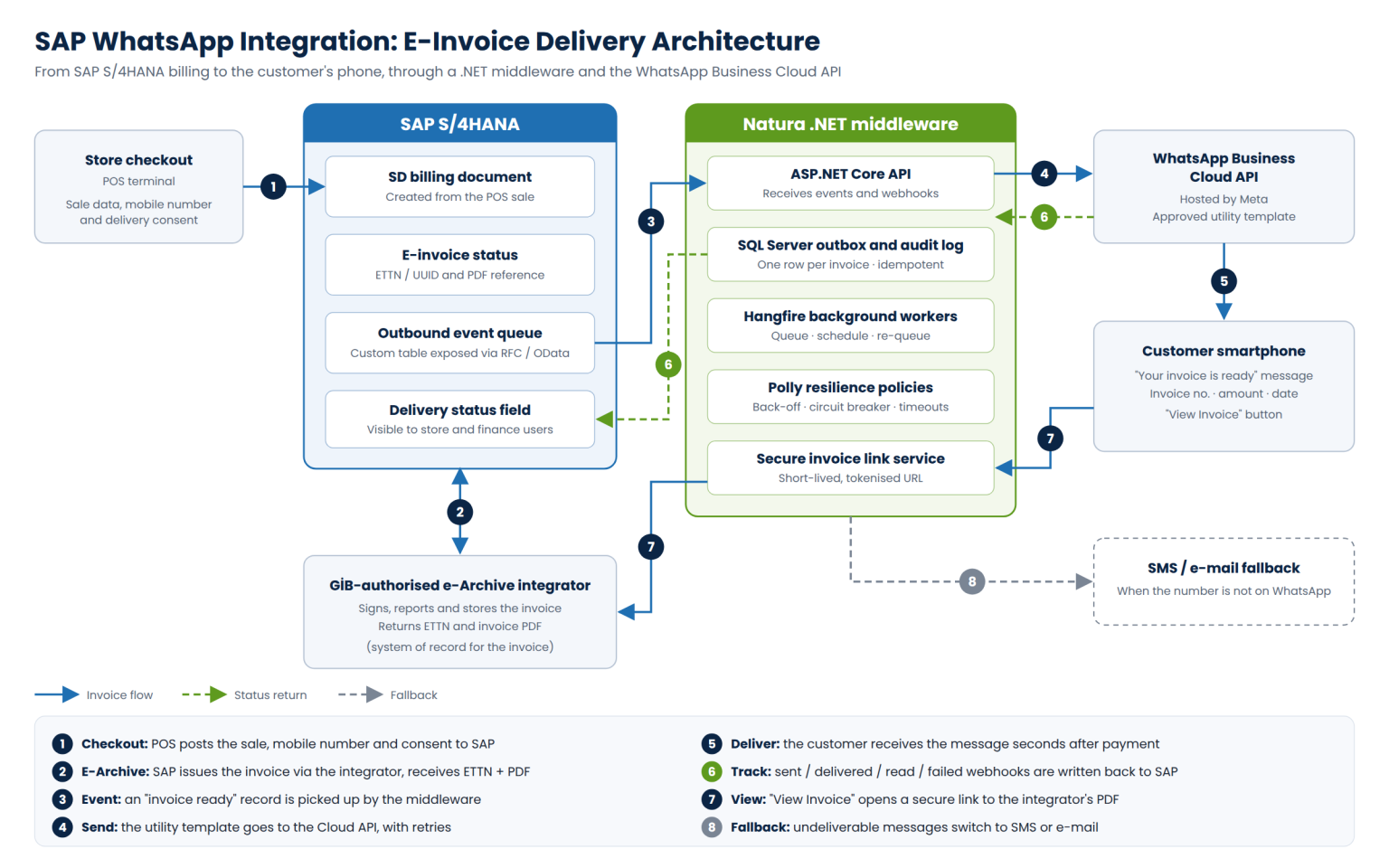
SAP WhatsApp Integration Architecture
The design follows the same principle as our SAP Webkassa integration: SAP decides what happens, and a separate .NET service does the talking to the outside world. That keeps the messaging workload off the SAP application servers, and SAP S/4HANA is never exposed to the internet.
SAP side: billing document, e-invoice status and the event queue
The .NET middleware: outbox, background workers and retries
WhatsApp Business Cloud API: templates, webhooks and fallback
The POS sale creates a billing document in SAP SD. SAP sends the e-Archive invoice to the GİB-authorised integrator, which signs, reports and stores it, then returns the ETTN (the invoice's unique identifier) and a PDF reference. Our work on B2B, B2C and e-archive systems means this step reuses the retailer's existing e-invoice flow unchanged.
Only when the e-invoice status is final does SAP write an "invoice ready" record to a small custom queue table: customer name, mobile number, consent flag, billing document number, gross amount, invoice date and ETTN. The middleware reads the queue through an RFC-enabled function module (via the SAP .NET Connector) or an OData service, depending on the landscape.
- The message never refers to an invoice that does not legally exist yet. It is sent only after the integrator has confirmed the e-Archive invoice, which keeps the process aligned with the retailer's legal and tax compliance
- Business rules stay in SAP. Which sales channels, stores or customer groups receive WhatsApp invoices is controlled by configuration in SAP, not by code in the middleware.
The middleware is an ASP.NET Core service with SQL Server storage. It was built for production from day one:
- NET Core API. Receives "invoice ready" events from SAP and status webhooks from Meta, and exposes health checks for monitoring.
- SQL Server outbox. Every invoice becomes one row, keyed by billing document number. A unique key makes every send idempotent: if SAP sends the same event twice, the customer still receives one message.
- Hangfire background workers. Pick up pending rows, send them, re-queue failures and run scheduled reconciliation jobs. The Hangfire dashboard shows queue depth and failed jobs at a glance.
- Polly resilience policies. Exponential back-off on transient errors and API throttling, a circuit breaker when the API is unavailable, and strict timeouts so one slow call never blocks the queue.
- Audit log. Every request, response and status change is stored with a timestamp, which gives finance the evidence trail it needs.
Messages go through the Meta-hosted WhatsApp Business Cloud API using a pre-approved Turkish utility template, "Faturanız Hazır" ("Your invoice is ready"). Four body fields are filled from SAP data, and the URL button carries a dynamic suffix that points to the invoice link service. More language versions can be registered under the same template name for customers who prefer Russian, Kazakh or English.
Status webhooks (sent, delivered, read, failed) are matched to their outbox row and written back to SAP, so store and finance users see the delivery status against the billing document without leaving SAP. If the API reports that a number cannot be reached on WhatsApp, the middleware switches to SMS or e-mail automatically.
- The “View Invoice” link: secure by design
- Consent and personal data
- The link carries a random, single-purpose token, never the invoice number or any customer data.
- Links expire after a configurable period [e.g. 30 days]; the customer can always request a new one from the store.
- The PDF is streamed from the integrator’s archive, so the customer always sees the official, signed document.
- Every access is logged against the invoice.
The mobile number is captured at the till together with an explicit delivery consent, either on the POS screen or through the in-store sales support app. It is normalised to international format and stored with a consent timestamp. The template contains transactional content only, and the middleware keeps just the personal data needed to send a message and prove delivery, under retention rules agreed with the retailer’s KVKK (Turkish personal data protection) team.